Fast selling at the till
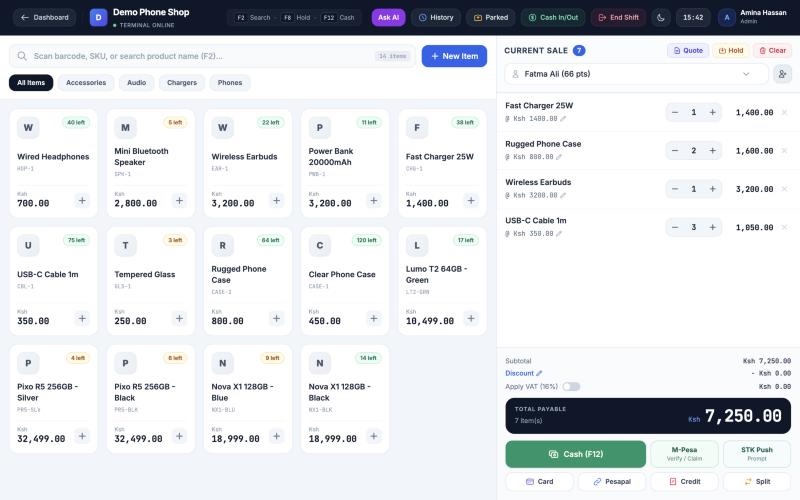
Scan barcodes or tap products, give discounts with a manager PIN, park sales and print thermal receipts or A4 invoices.
POS software in Kenya
CloudSync POS runs your till, stock, customers, suppliers and reports in one place. It works in any web browser, takes M-Pesa without mistakes and keeps selling when the internet drops.
Nothing to install. Works on a computer, tablet or phone.
Everything included
From the till to the supplier to the owner's reports, every shilling and every item is accounted for. Features marked Enterprise come with the Enterprise plan.
Scan barcodes or tap products, give discounts with a manager PIN, park sales and print thermal receipts or A4 invoices.
Send an M-Pesa prompt to the customer's phone and confirm it automatically. Take Pesapal card payments, split payments or sell on credit.
If the internet drops, sales are saved on the device and sent when it is back, with the time they really happened.
Every movement is recorded: sales, purchases, returns and adjustments. Cost is tracked by FIFO, average or latest price.
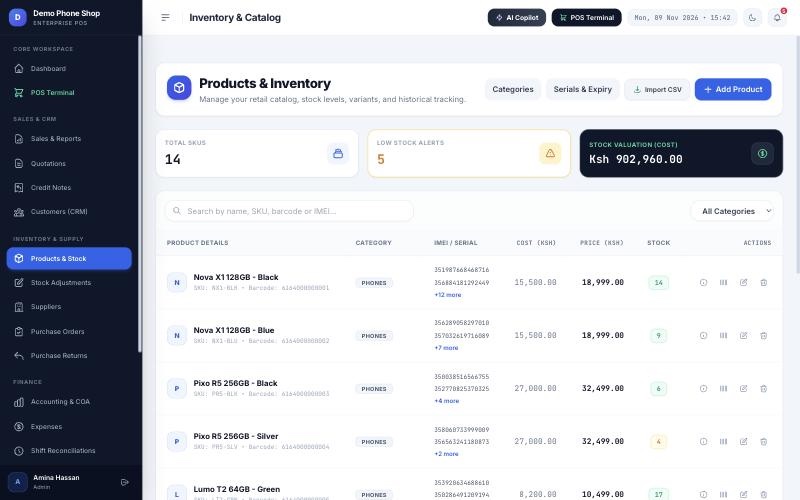
Scan many phones at once, sell by IMEI, print the IMEI and warranty on the receipt, and find any sold phone later.
Sell the batch that expires next, block expired stock and get alerts 30 days ahead.
Orders, deliveries, discounts, tax and shipping, supplier payments, returns and statements in one place.
Customer accounts, statements, loyalty points, quotations and credit notes, with debts tracked to the shilling.
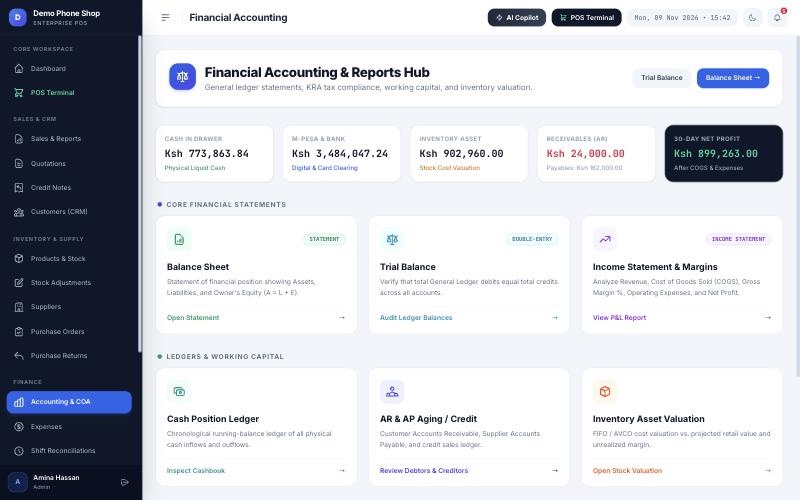
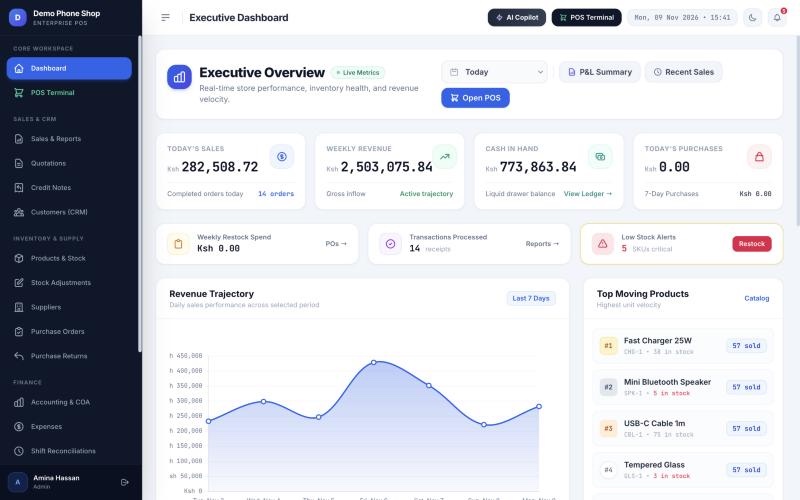
Daily sales, profit, VAT, stock value, best and slow sellers, cash position, trial balance and a balance sheet.
Admin, manager and cashier roles with permissions per person, a full audit trail and a drawer count at every shift.
A backup after each shift, with one kept for each of the last 7 days, and an optional copy to your own server.
Ask how to do anything in the system, fill purchases from a photo of a delivery note, and get answers from your own records.
See inside
These are the screens your team opens every day. The shop, products and figures are made up for the demonstration.
Compare
A sales book and a cash register can record what you sold. They cannot tell you who still owes you, which phone went to which customer, or what you really made today.
| What you need | Sales book | Basic till | CloudSync POS |
|---|---|---|---|
| Every sale recorded with its payment | No | Yes | ✓ Yes |
| M-Pesa payment confirmed automatically | No | Sometimes | ✓ Yes |
| Stock goes down when you sell | No | Yes | ✓ Yes |
| Customer debts and statements | By hand | Sometimes | ✓ Yes |
| IMEI and warranty for each phone | By hand | No | ✓ Yes |
| Profit, VAT and stock value reports | No | Sometimes | ✓ Yes |
| Keeps selling when the internet drops | Yes | Yes | ✓ Yes |
| Staff permissions and an audit trail | No | Sometimes | ✓ Yes |
Built for Kenya
Your own paybill or till number, with the payment confirmed by Safaricom before the sale closes. No more checking messages.
The till keeps working offline and catches up by itself, so a dropped connection never stops a sale.
Prices and receipts show 16% VAT, your KRA PIN prints on receipts and invoices, and the VAT report is one click away.
Talk to a person on WhatsApp or by phone, in Kenya and on your schedule.
Who it's for
Receive a box of phones by scanning their IMEIs, sell by IMEI and print the warranty on the receipt.
Track batches and expiry dates, sell the earliest expiry first and block expired stock (Enterprise).
Fast barcode scanning, many products, low stock alerts and a drawer count for every cashier.
Credit accounts and statements for trade customers, quotations that become invoices, and wholesale prices (Enterprise).
Loyalty points for repeat customers, plus product colours and WhatsApp receipts (Enterprise).
Customer credit and statements you can follow up, supplier payments in one place, and bulk prices from a set quantity (Enterprise).
How it works
Call or WhatsApp us. We will ask what you sell, how many staff and tills you have, and how you take payments.
Your own address and database, your products, staff accounts and M-Pesa details, ready to use.
Open the till in any browser and take your first sale. Your reports fill in from the first shilling.
Questions
Look for M-Pesa that is confirmed automatically, stock that updates with every sale, customer credit, VAT reports, and a till that keeps working when the internet drops. CloudSync POS does all of these, and you can see it working in your own shop before you decide.
Yes. Ordinary sales keep working when the internet drops. They are saved on the device and sent automatically when the connection returns. Products with serial or IMEI numbers need the internet to sell.
Yes. The till sends an M-Pesa prompt to the customer's phone and confirms the payment by itself, using your own paybill or till number. Card payments through Pesapal, cash, split payments and customer credit are also supported.
A computer, tablet or phone with a web browser. A barcode scanner and a thermal receipt printer are optional. There is nothing to install.
Yes. You can receive many phones at once by scanning or uploading their IMEIs, sell each one by IMEI, print the IMEI and warranty on the receipt, and look up any phone you have sold.
Each shop has its own separate database. Passwords and PINs are stored securely, staff only see what their role allows, every change is logged, and backups run every day.
Yes. Products, customers and suppliers can be imported from a spreadsheet (CSV), and opening stock and balances can be entered when you start.
It depends on your shop and the features you need. Call or WhatsApp +254 741 036 130, or email admin@cloudsync.co.ke, for a quote.
Tell us about your shop and we will show you the system, recommend a plan and give you a quote.